![Logo-2.svg]](https://support.pointapp.org/hubfs/Logo-2.svg)
How do I register for an event with guests?
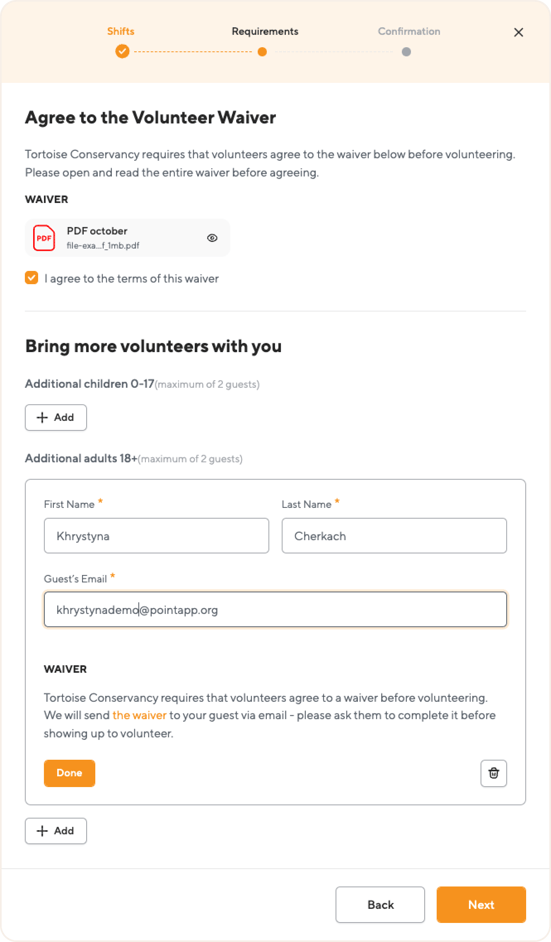
1. When registering for an event, you will encounter an additional step titled "Additional Volunteers," offering the option Additional adults 18+
2. You must enter the following information for each adult guest: First Name, Last Name, and Guest’s Email.
3. The organization requires that volunteers agree to a waiver before volunteering. We will send the waiver to your guest via email - please ask them to complete it before showing up to volunteer.
5. Confirm your registration. As a result, you and 1 additional volunteer signed up to volunteer!
The guest's waiver will remain in a pending status until they complete the confirmation process via the email link provided.
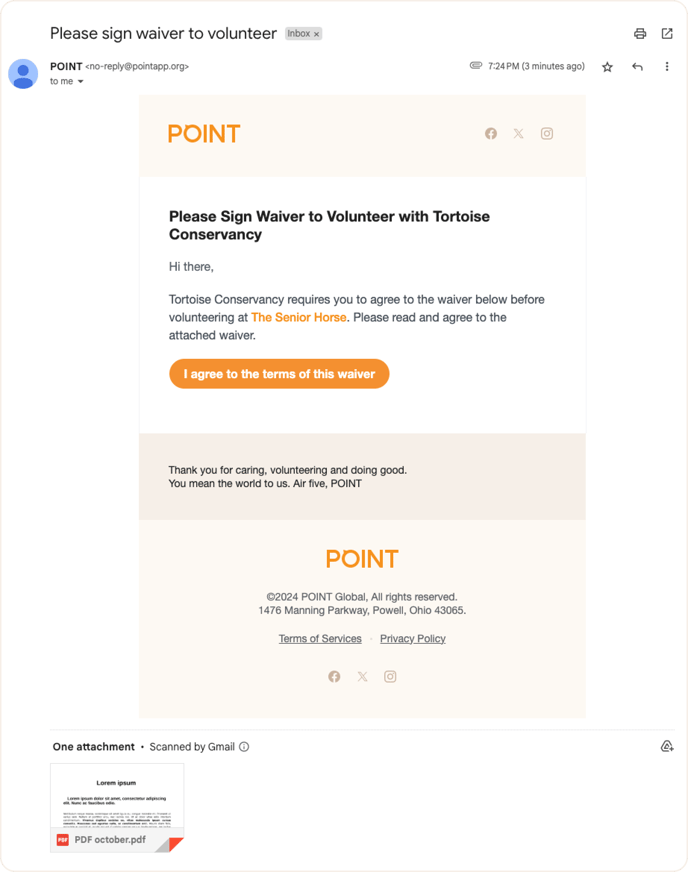
The guest will receive a letter “Please sign waiver to volunteer”
To confirm the waiver, click on “I agree to the terms of this waiver” and follow the link. You will receive a notification “You have successfully signed the waiver. The organization looks forward to seeing you at the event!”.
Questions? Email us at support@pointapp.org.