![Logo-2.svg]](https://support.pointapp.org/hubfs/Logo-2.svg)
Step 1: Select "Volunteers" in the left hand side menu.
Step 2: Select "Manage Events" in the sub menu under Volunteers
Step 3: On the event you'd like to approve volunteers for click the "Volunteers" button. 
Step 4. On this "Event Details" Page, under the "Volunteers List Tab" you'll see a list of volunteers registered for the event with the status of their background checks displayed.
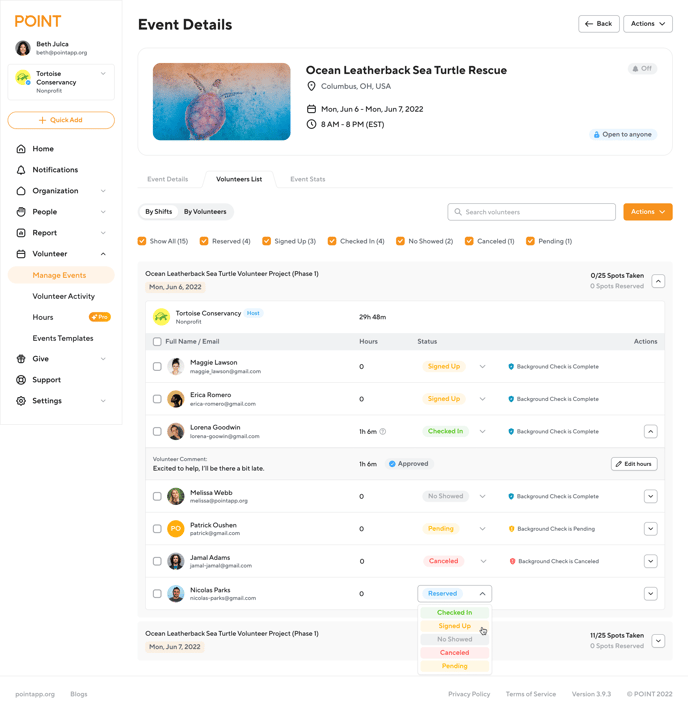
Step 5: Make sure that once your organization sees there is a completed background check that you complete the adjudication process in Checkr. As an admin, you must manually approve a volunteer's registration by changing their registration from "Pending" to "Signed Up" in the Event Details Volunteer List.
Note: Completed does not mean a volunteer has "passed" a background check screening. "Completed" simply means that the screening process has been completed. If a check has been completed, the nonprofit admin must approve the volunteer for an opportunity or event. See all the Background Check Status Types below.
Note: To understand the background check process for volunteers, read this article.
Note: Volunteers' background check reports are not stored in POINT, they are only stored in Checkr. However, POINT stores the status of the screening.
If you'd like to view a volunteer candidate's background check you can go directly to your Checkr account and search for the volunteer by name. Or you can find the quick links to a volunteer's Checkr profile and report in POINT.
Background Check Status Types: