![Logo-2.svg]](https://support.pointapp.org/hubfs/Logo-2.svg)
Every organization has an Owner on every plan. On the Teams plan, the Owner is also the only person who can assign team roles.
When someone with this role logs in, their account menu in the top right corner shows the Owner badge.
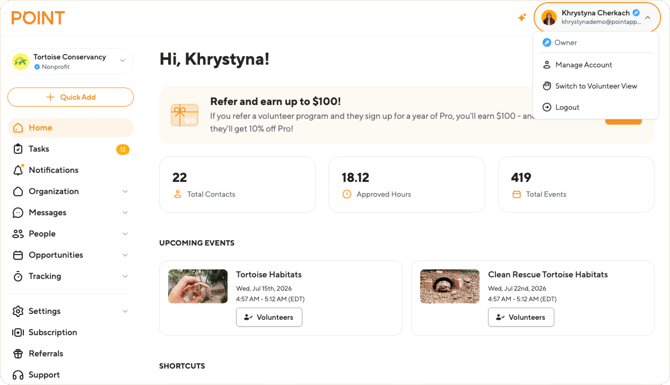
What an Owner can see and do
The Owner has complete access to every page and every action in POINT:
| Menu item | Access |
|---|---|
| Home | ✅ Full dashboard access, including the organization setup and onboarding steps |
| Tasks | ✅ Review and approve pending items: organization join requests, volunteer hours, and check-ins |
| Notifications | ✅ Personal notification list covering the whole organization |
| Organization: Profile | ✅ View and edit the organization profile and details |
| Organization: Programs | ✅ Full program management: create, edit, and delete programs and subprograms, add contacts, and add admins to programs |
| Organization: Documents | ✅ Full document management: upload new documents, edit them, and manage document versions |
| Organization: Form Fields | ✅ Full access, including creating custom questions |
| Organization: Waivers | ✅ Full access, including creating new waivers |
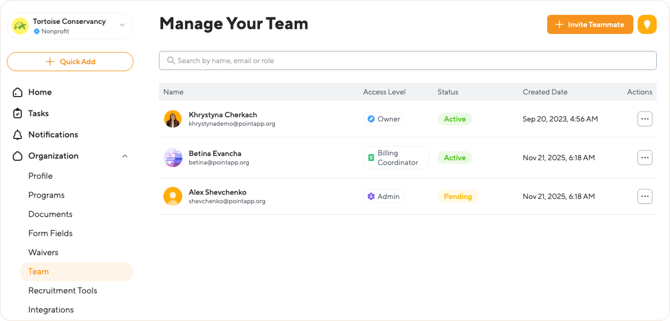
| Organization: Team | ✅ Invite team members, assign and change roles, and remove team members. Only the Owner can do this |
| Organization: Recruitment Tools | ✅ Create website widgets and manage the organization's public POINT page settings |
| Organization: Integrations | ✅ Set up and manage all integrations |
| Messages | ✅ Send emails and texts to volunteers, contacts, and groups |
| People: Applications | ✅ Full access: create general or program applications |
| People: Contacts | ✅ Full contact management |
| People: Groups | ✅ Full group management |
| People: Background Checks | ✅ Full access, including sending new check requests |
| Opportunities: Manage Events | ✅ Full event management: create and manage events, assign contacts, change attendance statuses |
| Opportunities: Events Templates | ✅ Full access |
| Opportunities: Check-In Stations | ✅ Create and manage check-in stations (kiosks) |
| Opportunities: Active Clock-Ins | ✅ See volunteers who are currently clocked in through a station |
| Tracking: Hours | ✅ Full access: view, add, edit, approve, and export hour records |
| Tracking: Activity | ✅ View volunteer activity across the organization |
| Tracking: Stats | ✅ View volunteer statistics |
| Tracking: Reports | ✅ Generate any report: event lists, hours, volunteer leaderboard, volunteer details, youth volunteering, and application responses |
| Settings: General | ✅ Manage organization privacy, default recruitment tool, volunteer hour value, and check-in and hours approval settings |
| Settings: Email Notifications | ✅ Manage notification preferences |
| Subscription | ✅ View and manage the plan, billing details, and invoices |
| Referrals |
✅ Full access to the referral program |
Actions only the Owner can do
A few actions are reserved for the Owner and are not available to any other role:
| Action | Who can do it | Available on |
|---|---|---|
| Edit the organization profile and details | Owner | Free, Pro, and Teams plans |
| Manage General Settings (organization privacy, check-in and hours approval, hour value) | Owner | Free, Pro, and Teams plans |
| Manage the subscription and billing | Owner and Billing Coordinator | Free, Pro, and Teams plans (the Billing Coordinator role itself is available on the Teams plan) |
| Invite team members, change roles, and remove team members | Owner | Free, Pro, and Teams plans |
| Assign team roles other than Admin | Owner | Teams plan only |
| Add admins to a specific program, event, or group | Owner | Teams plan only |
An Admin can open the Team page and see the list of team members, but cannot invite anyone or change roles.
Owners and team roles
Team roles are available on the Teams plan, and only the Owner can assign them. When inviting a teammate on the Team page, the Owner picks a role and, for coordinator roles, chooses which programs, events, or groups the person will manage.
For details, see [link: How to add admins and assign team roles] and [link: Team roles in POINT: overview].
Frequently asked questions
-
Can an Admin do everything an Owner can?
Almost. An Admin runs day-to-day operations across the whole organization, but cannot edit the organization profile, manage General Settings, manage the subscription, manage team members and their roles, or add admins to programs, events, and groups. See [link: What can an Admin do in POINT].
-
Who can manage billing besides the Owner?
The Billing Coordinator role also has full access to the subscription and billing. This role is available on the Teams plan.