![Logo-2.svg]](https://support.pointapp.org/hubfs/Logo-2.svg)
In this article:
Roles are available on the Teams plan. Only the account Owner can assign roles. To learn, see How to add admins and assign team roles.
What access does an Event Coordinator have?
Event-level access:
- Manage assigned events and schedules
- View and manage event participants
- Send messages to event participants
- Track attendance and shifts
Not included:
- Programs outside assigned events
- Contacts outside their assigned events
- Organization settings
- Billing or subscription
When someone with this role logs in, their account menu in the top right corner shows the Event Coordinator badge, so it is always clear which access they have.
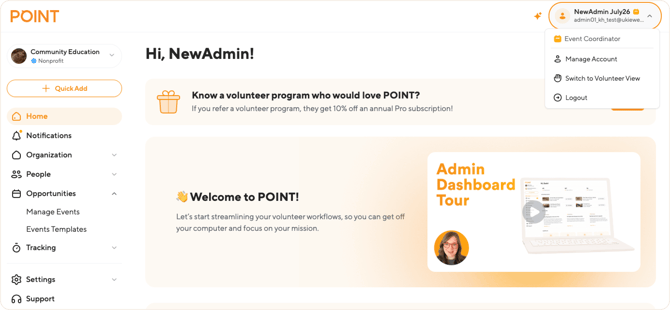
Which events an Event Coordinator can access
When the Owner assigns this role, they choose between two options:
- All events: access to every event in the organization, including events created in the future.
- Specific events: access only to the selected events.
This choice affects more than the event list. Other pages adjust too. For example, the Programs page shows only the programs that the coordinator's events belong to.
An Event Coordinator cannot create new events. They can only manage the events an Owner, Admin, or Program Coordinator has already created and assigned to them.
Which contacts can an Event Coordinator see?
An Event Coordinator sees only the contacts who are signed up for their assigned events — whether they have access to all events or specific ones. This applies everywhere in the dashboard:
- Contacts shows only contacts registered for their events.
- Groups are all visible in the group list, but inside each group, the coordinator sees only the members they have access to.
- Programs show only program details; contacts inside a program are limited to their assigned events.
- Messages can be sent only to contacts from their assigned events — selecting "All contacts" includes only the contacts available to this role.
- The same rule applies to every page that displays contact data: Form Fields responses, Waivers, Background Checks, Hours, and Activity.
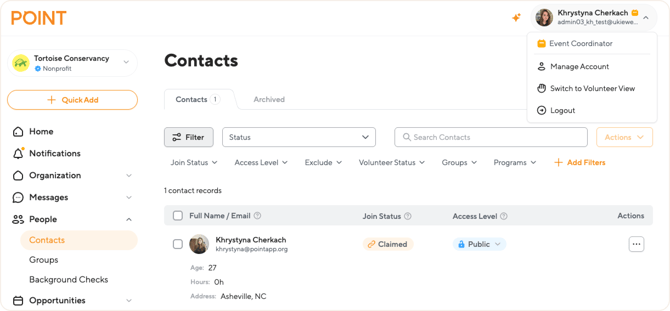
Assigning an Event Coordinator to specific events
When inviting someone as an Event Coordinator, the Owner or Admin chooses their event access as part of the invite flow:
- Pick Access — select the Event Coordinator role and choose All events or Specific events
- Choose Events — if "Specific events" was selected, pick which events this person will manage
- Confirm and Invite — review and send the invitation
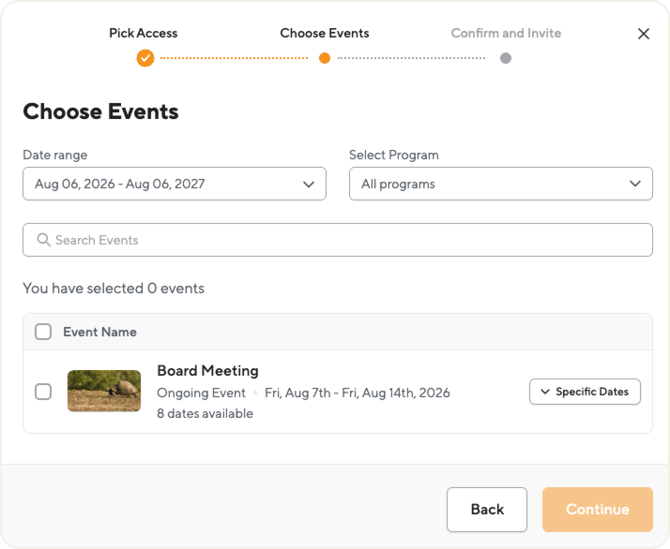
On the Choose Events step, access can be narrowed down further:
- Date range and Select Program filters help find the right events
- For recurring events, the coordinator can be assigned to all dates or only specific dates — for example, only the sessions they'll actually run
If "All events" is selected during Pick Access instead, this Choose Events step is skipped, and the coordinator automatically gets access to every event in the organization, including any created afterward.
What an Event Coordinator can see and do
Here is the full breakdown by menu item:
| Menu item | Access |
|---|---|
| Home | ✅ Full access to the dashboard with general organization information |
| Notifications | ✅ Personal notification list with updates related to their events |
| Organization: Profile | ✅ View organization details ❌ Cannot edit organization details |
| Organization: Programs |
✅ View the program list and program details only. With access to specific events, only the programs those events belong to are visible. Contacts shown inside a program are limited to those from their assigned events |
| Organization: Documents |
✅ View the document library and document details, download documents, and mark them as active or inactive |
| Organization: Form Fields | ✅ View the list of questions and question details, including the Responses and Events tabs — limited to their assigned events and contacts ❌ The Applications tab is not available ❌ Cannot create new questions |
| Organization: Waivers |
✅ View the waiver list and waiver details. Volunteer agreements are limited to contacts from their assigned events |
|
Messages |
✅ Send emails and texts to contacts from their assigned events. The "All contacts" option includes only the contacts available to this role |
| People: Contacts | ✅ View and manage contacts who are signed up for their assigned events ❌ Cannot create contacts from the Contacts page — new contacts can only be added when assigning volunteers to an event ❌ Cannot see contacts outside their assigned events ❌ Cannot add contacts to groups or programs |
| People: Groups | ✅ View the group list and group details. Group members are limited to contacts from their assigned events ❌ Cannot create groups or add contacts to them |
| People: Background Checks | ✅ View check results for contacts from their assigned events ❌ Cannot send new check requests |
| Opportunities: Manage Events | ✅ Edit and manage their assigned events: edit details, manage shifts, track attendance, export data ❌ Cannot create, duplicate, cancel, or delete events. See the next section for details |
| Opportunities: Events Templates | ✅ Can view and apply event template. ❌Cannot create new events or templates — event creation is intended for the Owner, Admin, or Program Coordinator |
| Opportunities: Check-In Stations |
✅ View and use existing check-in stations for their events. |
| Tracking: Hours | ✅ Full access to creating and editing hour records |
| Tracking: Activity | ✅ View volunteer activity |
| Settings: Email Notifications | ✅ Manage their own email notification preferences |
All other menu pages, including Team, Integrations, Recruitment Tools, Referrals, and Subscription, are not available for this role. If an Event Coordinator needs something from these pages, they should contact the organization Owner or an Admin.
Working with events
Events are the core of this role. Within their assigned events, an Event Coordinator has the full set of event tools:
- Edit existing events, including individual dates of recurring events
- Manage shifts: assign spots, reserve spots, and track attendance
- View event responses and stats
- Export the participant list to CSV and print the shift coordinator worksheet
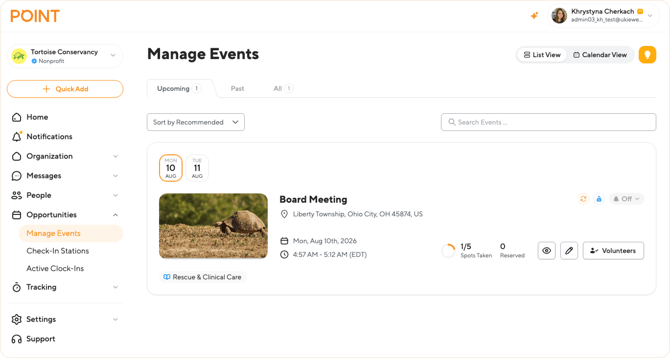
Adding contacts to an event
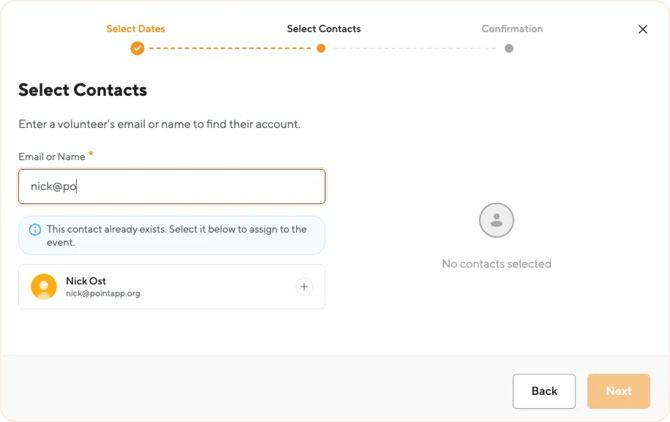
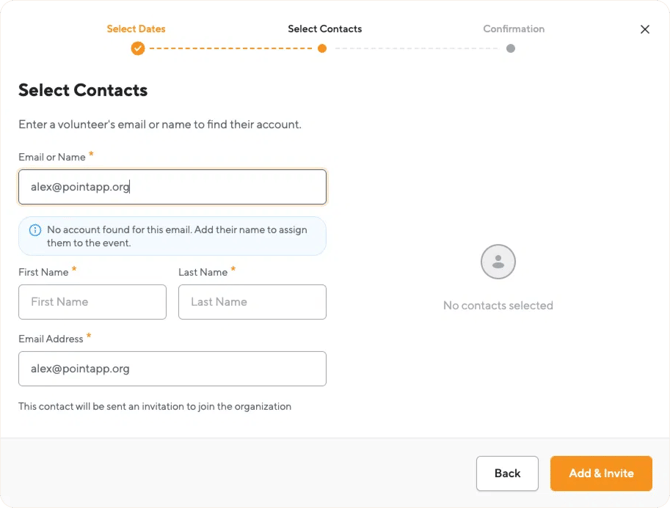
Adding contacts is available to this role only through the event flow — the Contacts page itself has no option to create a contact. When assigning volunteers to an event, the coordinator searches by email or name on the Select Contacts step:
- If the contact already exists in the organization — even one the coordinator can't normally see — the system finds the match and offers to select it, showing only the contact's name and email. Once assigned to the event, the contact becomes visible to the coordinator.
- If no account is found for the email, the coordinator can create a new contact by entering their first name, last name, and email address, then selecting Add & Invite. The new contact receives an invitation to join the organization and is linked to the event.
Event Coordinators work only with existing events — they do not go through event setup. They can still view pages like Programs, Documents, Form Fields, and Waivers to see the details attached to their assigned events, even though they cannot create new ones.
Each event also has an Admins tab that shows who manages the event. Only the Owner can add admins to an event.
Frequently asked questions
-
Can an Event Coordinator see billing or subscription details?
No. Billing and subscription pages are not available for this role. Billing is managed by the Owner or a Billing Coordinator.
-
Can an Event Coordinator run reports?
No. Reports are available to the Owner and Admin roles. An Event Coordinator can track hours and view volunteer activity for their events instead.
-
Can an Event Coordinator see all contacts in the organization?
No. An Event Coordinator sees only contacts signed up for their assigned events. When adding someone to an event, they can search the full organization by email or name, but only the name and email of a match are shown until the contact is assigned to their event. When sending messages, the "All contacts" option includes only the contacts available to this role.
-
Can an Event Coordinator create or delete events?
No. Creating, duplicating, canceling, and deleting events are limited to the Owner, Admin, and Program Coordinator roles. An Event Coordinator edits and manages the events already assigned to them.
-
Can an Event Coordinator create check-in stations?
No. They can use existing check-in stations for their events, but cannot create new ones.
-
Can an Event Coordinator invite other team members?
No. Only the Owner or Admin can invite teammates and assign roles.