![Logo-2.svg]](https://support.pointapp.org/hubfs/Logo-2.svg)
Roles are available on the Teams plan. Only the account Owner can assign roles. To learn more, see How to add admins and assign team roles.
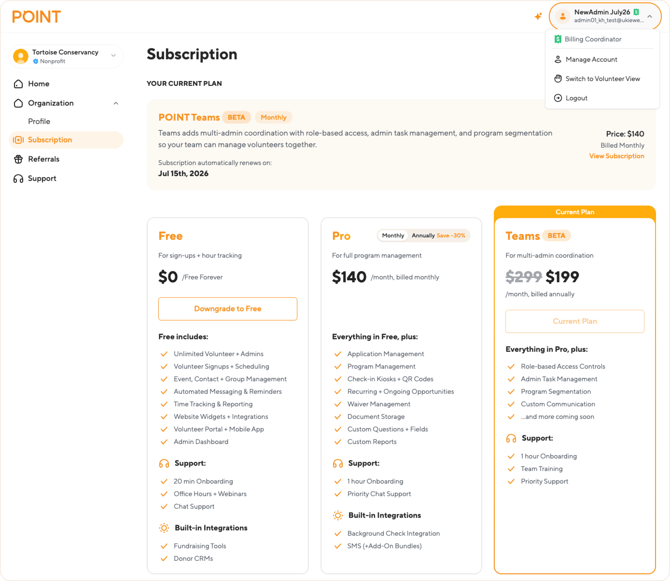
When someone with this role logs in, their account menu in the top right corner shows the Billing Coordinator badge, so it is always clear which access they have.
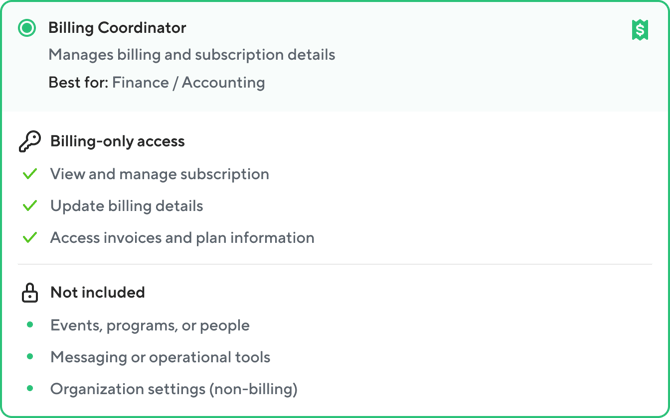
What a Billing Coordinator can see and do
This role has billing-only access. The menu shows only the pages needed for managing the subscription:
| Menu item | Access |
|---|---|
| Home | ✅ Full access to the dashboard with general organization information |
| Organization: Profile | ✅ View organization details ❌ Cannot edit organization details |
| Subscription | ✅ Full access: view and manage the subscription plan, update billing details, and access invoices and plan information |
| Referrals | ✅ Full access to the referral program |
| Support | ✅ Full access to support resources |
All other menu pages are not visible for this role. A Billing Coordinator does not see events, programs, contacts, groups, messages, tracking, or any other part of POINT outside of billing.
Working with the subscription
On the Subscription page, a Billing Coordinator can:
- See the current plan, its price, and the renewal date
- Change the organization's plan
- Update billing details and the payment method
- Access invoices and plan information
Frequently asked questions
-
Can a Billing Coordinator see volunteers, events, or programs?
No. This role has billing-only access. Pages related to volunteers, events, programs, and messaging are not visible.
-
Can a Billing Coordinator invite other team members or change roles?
No. Only the Owner can invite teammates and manage roles.
-
Who else can manage billing?
The Owner also has full access to the Subscription page. The Admin role does not include subscription management.