![Logo-2.svg]](https://support.pointapp.org/hubfs/Logo-2.svg)
Roles are available on the Teams plan. Only the account Owner can assign roles. To learn how to assign this role, see How to add admins and assign team roles.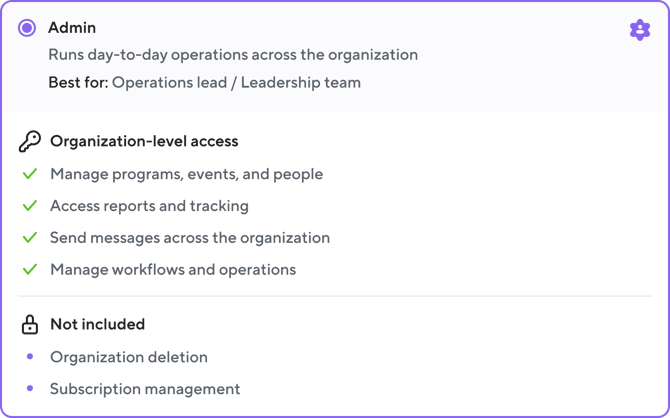
Note: on the Free and Pro plans, every teammate has this level of access. On the Teams plan, Admin is one of six roles you can assign.
What an Admin can do
An Admin has organization-level access and works across the entire organization, without limits on specific programs, events, or groups. This includes the full functionality of:
- Programs, events, event templates, check-in stations, and clock-ins
- Contacts, groups, applications, and background checks, including sending new check requests
- Documents, form fields, and waivers, including creating new ones
- Messages: sending emails and texts
- Hours, activity, stats, and reports
- Recruitment tools and integrations
- Tasks: reviewing and approving join requests, hours, and check-ins
In short, an Admin can do everything in the day-to-day running of the organization. The only exceptions are listed below.
| Action | Who can do it | Available on plans |
|---|---|---|
| Edit the organization profile and details |  |
Free, Pro, and Teams |
| Manage General Settings (organization privacy, check-in and hours approval, hour value) |  |
Free, Pro, and Teams |
| Manage the subscription and billing |
|
Free, Pro, and Teams (the Billing Coordinator role itself is available on the Teams plan) |
| Invite team members, change roles, and remove team members | Owner & Admin | Free, Pro, and Teams |
| Assign team roles other than Admin | Owner & Admin | Teams plan only |
| Add admins to a specific program, event, or group | Owner & Admin | Teams plan only |


Frequently asked questions
-
Can an Admin pay for the subscription or change the plan?
No. Billing is available to the Owner and the Billing Coordinator role.
-
Can an Admin invite other admins or change someone's role?
Yes. An Admin can invite teammates and change roles for other admins, but cannot change an Owner's role or permissions.
-
What is the difference between the Owner and an Admin?
The Owner can do everything an Admin can, plus: edit the organization profile, manage General Settings, manage the subscription, manage team members and their roles, and add admins to programs, events, and groups.